Displays
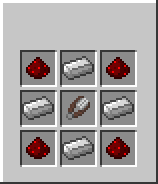
Displays are signs that display information about a machine. To link a sign to a machine, you first need to craft a sign linker(Recipe below). Next you need to bind the sign linker to the machine you wish to link to a sign. To do this, simply right-click on the machine with the sign linker in hand. PowerCraft will send a message to you saying the linker was bound. If you would like to clear the machine stored in the sign linker simply right-click air with the sign linker in hand. Next, right-click on any sign in the world that is not already linked to a machine. The is now linked to the machine and will display information about it!
Crafting
To craft a sign linker use the following recipe:
Compatible Machines
- Generator